medium · March 29, 2026
Self-Healing Container Infrastructure with Docker Swarm on AWS EC2

Prompt: Claude Image: Chat GTP
When A Container Dies at 2am, Who Restarts it?
In a kitchen, the answer is nobody the station just goes down and you start losing tickets.
In cloud infrastructure, for a lot of teams, the honest answer is the same. Someone gets paged, someone logs in, someone manually restarts the container, and the whole time your application is either degraded or completely dark.
That was the situation I was asked to solve for a global shipping company. Their containerized workloads were failing with no recovery mechanism. When a container went down, it stayed down. No rescheduling. No alerting. Just a dead process and potential data loss until someone noticed.
They had one week to fix it.
The Real Problem Wasn’t the Containers
It would be easy to look at this scenario and say the problem is unstable containers. Fix the app, fix the crashes.
But that’s not the right lens. Containers fail. Networks hiccup. Nodes get overloaded. In a distributed system running a global application, you are not designing for the happy path you are designing for the inevitable failure.
The actual problem was that the company had no orchestration layer. They were running standalone Docker containers with no manager watching over them. One container per host, no clustering, no desired state, no reconciliation loop.
In kitchen terms: they had talented cooks but no chef watching the line. The moment one station went down, nobody knew, nobody covered it, and tickets started piling up.
The Discovery: Docker Swarm and the Global Service
Docker Swarm turns a group of individual machines into a single, self-managing cluster. You define what you want running one container of your shipping application on every node and Swarm’s job is to make sure reality matches that definition at all times.
If a container dies, Swarm reschedules it. If a node goes offline, Swarm marks it down and redistributes workloads. You stop reacting to individual container failures because the system handles them automatically.
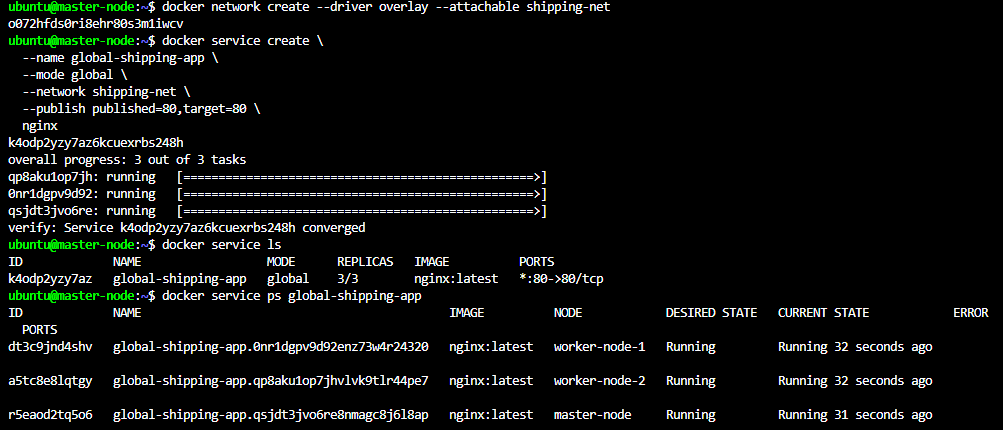
The specific feature that solved this company’s problem is called a global service.
There are two ways to run services in Swarm:
- Replicated — runs copies of a container, distributed across however many nodes Swarm chooses
- Global — run exactly one container on every single node in the cluster, always
For a global shipping application that needs consistent coverage across all infrastructure, the global mode is the right tool. Add a new node to the cluster and Swarm automatically starts the container on it. Lose a node and bring it back and the container comes back with it.
The Framework: How We Built It
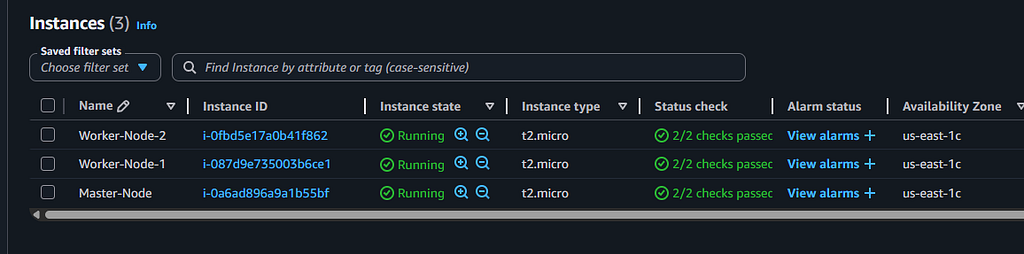
Here is the full setup, step by step. All three nodes are AWS EC2 instances running Ubuntu 20.04.
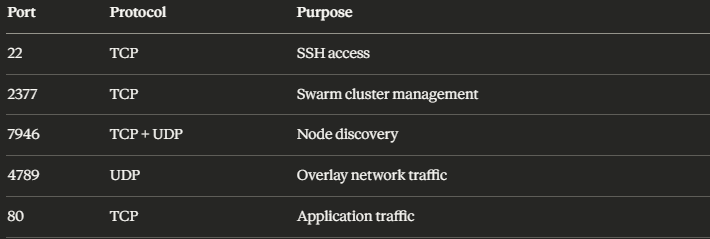
Infrastructure: Three EC2 instances sharing a single Security Group with the following inbound rules open between all nodes:
- SSH into all 3 nodes via VSCode
- Name each node with sudo hostnamectl set-hostname. Naming one as master-node and the other 2 as worker-node-1 and worker-node-2 and verify with hostnamectl command.
- Install Docker on all three instances → verify its running
- Initialize the Swarm on master-node with swarm init — advertise-addr <MASTER_PRIVATE_IP>
- Copy the generated token and Ip address and in each worker node instance paste it after the
docker swarm joincommand. docker swarm join— token SWMTKN-1-<MASTER_PRIVATE_IP>:2377

- Now that the Swarm is connected we can create an overlay network then deploy and verify our global service .
What Actually Changed
The company came in with two fears: containers failing with no recovery, and no way to restore data from unhealthy containers.
Both of those are now handled automatically by the reconciliation loop that runs inside every Docker Swarm cluster. The manager node continuously compares the actual state of the cluster against the desired state you defined. When they diverge a container crashes, a node goes offline Swarm closes the gap without human intervention.
This is the thing I keep coming back to in my own training: the best infrastructure isn’t the infrastructure that never fails. It’s the infrastructure that already knows what to do when it does.
In a kitchen, you don’t build a great service by hoping nothing goes wrong. You build it by designing the response to failure into the system itself backup prep, trained cross-functional staff, and clear communication when a station goes down.
Docker Swarm is that system for containers.